Click to Pay: faster online payments, worry-free
Online shopping is already part of our daily routine. Whether you’re ordering something for your home, planning a vacation, or taking advantage of an offer you don’t want to miss, you’ve certainly gone through the same process many times: entering your card number, expiration date, and CVV code, then double-checking that everything is correct.
What is Click to Pay?
It is a solution that allows you to enroll your card once and then use it at participating merchants without having to enter all your card details every time.
Think of Click to Pay as a faster checkout for online shopping. Once you enroll your card, you can select it directly whenever you see the Click to Pay symbol on the store’s payment page... and with just a few clicks, your order is ready.
In addition, the experience is just as easy whether you shop on your phone, tablet, or laptop. Fast, with no extra steps.

How?
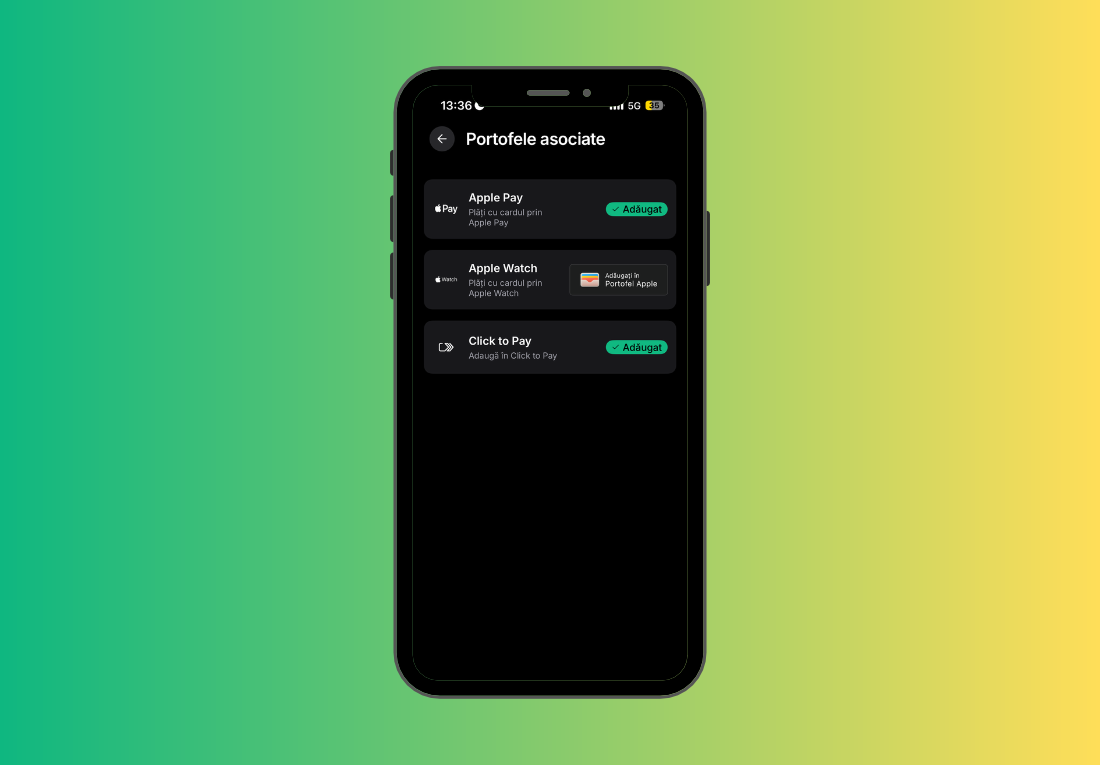
Go to the Cards section in the new BT Pay and select the card for which you want to activate Click to Pay. Tap on "More" and choose "Associated Wallets" – from here, tap on "Add to Click to Pay". That's it! ✨
So... what benefits do you get?
Let's see exactly:
- Pay online faster: you enroll your card just once, and then you can use it at checkout without having to enter the card number, expiration date, or CVV code each time.
- You get to order confirmation faster: fewer fields to fill in means a simpler and smoother payment process when shopping online.
- More security for your payments: you no longer need to enter your card details for each transaction, and payments benefit from the same security and authentication mechanisms you already use.
- Multiple cards, the same profile: if you have multiple eligible cards, you can have them in the same Click to Pay profile and choose the right one.
- You use the same experience on any device: you can pay from your phone, tablet, or laptop without having to reconfigure the service each time.
- Simple and familiar checkout: Wherever you see the Click to Pay symbol, the payment process is intuitive and fast. You choose the card, confirm the payment, and continue shopping without having to search for or enter your card details.
Click to Pay makes your online shopping a little easier every time. You enroll your card just once, and then it’s ready whenever you need it. Fewer fields to fill in, less hassle, and more time for what you need to do. 💛